
1.
Account settings
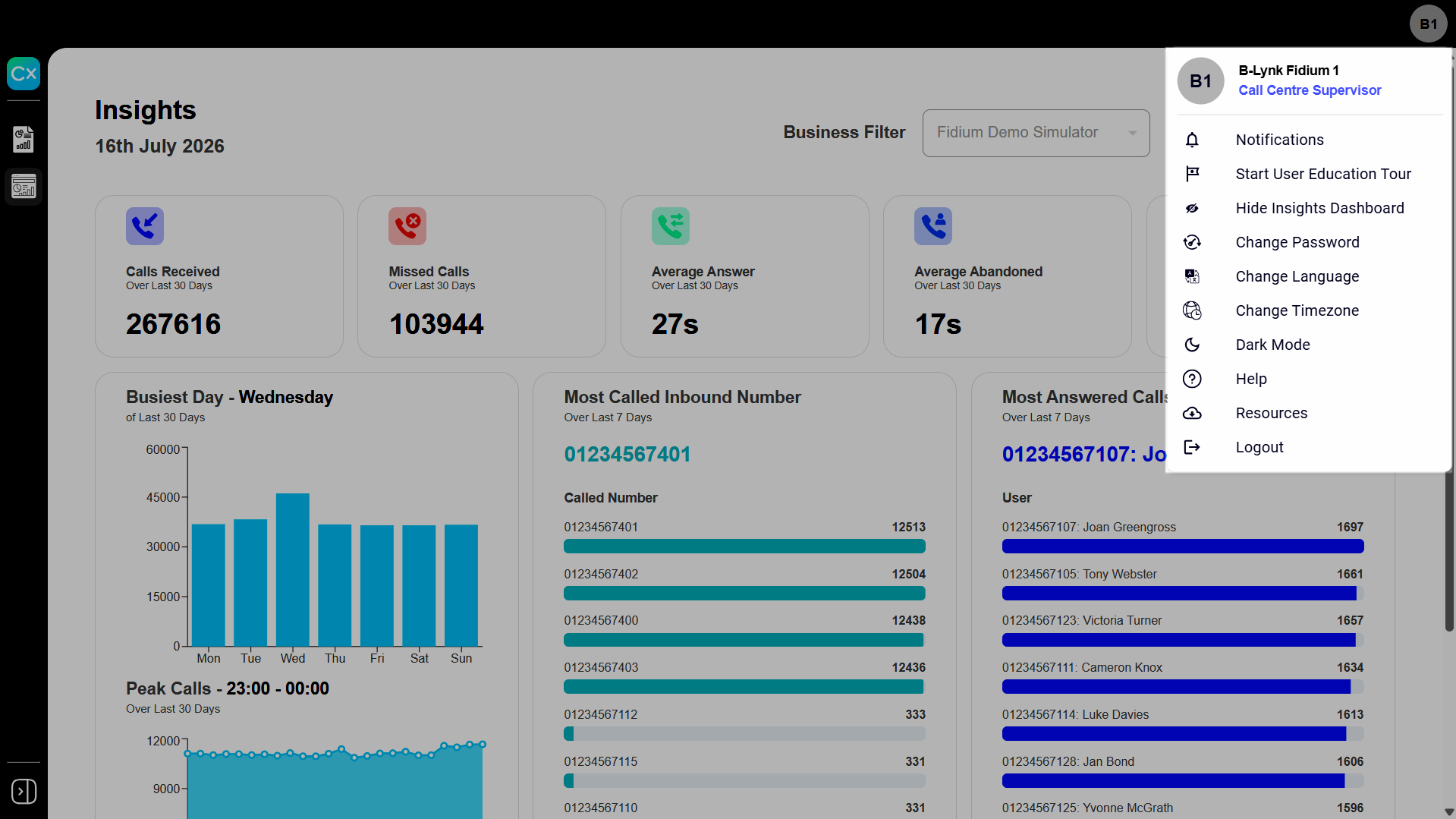
Click your profile icon to access account options and settings.
- Notifications - Manage your system settings and preferences.
- Start User Education Tour - Launch a guided walkthrough of the reporting interface.
- Show/Hide Insights Dashboard - Shows or hides the Insights dashboard.
- Change Password - Update your account password.
- Change Language - Set your preferred interface language.
- Change Timezone - Adjust how dates and times appear throughout your reports and dashboard.
Note: On sign-in, if your computer's time zone differs from the server's default, you're prompted to switch to local time. Accepting shifts every report timestamp accordingly — a call at 11:00 AM Central shows as 12:00 PM Eastern.
- Dark Mode - Switch the interface between light and dark display modes.
- Help - Open the online help resources.
- Resources - Open additional Akixi resources and links.
Select Logout to securely end your session.
Click image for large view