
MENU

1.
Introduction
Enhanced Emergency (E911) supports organizations with hybrid or nomadic workforces by providing dynamic location tracking for voice users. Emergency calls are routed through a dedicated network to the appropriate Public Safety Answering Point (PSAP) across the U.S., its territories, and Canada.
As of January 6, 2022, federal law requires organizations with movable or nomadic voice lines to automatically transmit a caller's dispatchable location to 9-1-1 operators, ensuring first responders can quickly and accurately locate the caller.
Administrators can enable the Emergency Call Notification feature from the Odin Admin Portal for the entire company or enterprise.
2.
Configure Emergency Call Notifications
Emergency Call Notification automatically sends a system-generated email when an emergency call is placed, including the caller's identity and assigned location details.
To configure emergency call notifications:
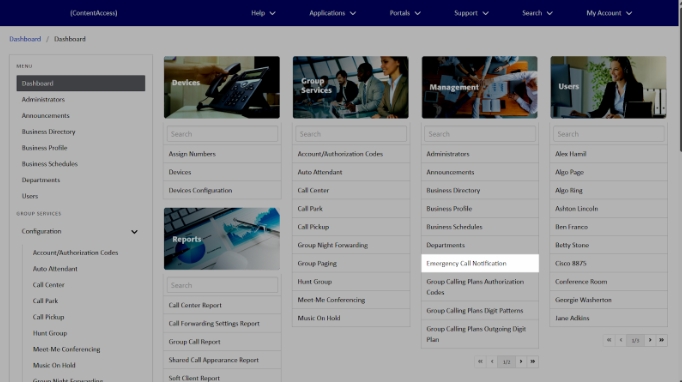
- From the group dashboard, under Management, select Emergency Call Notification.
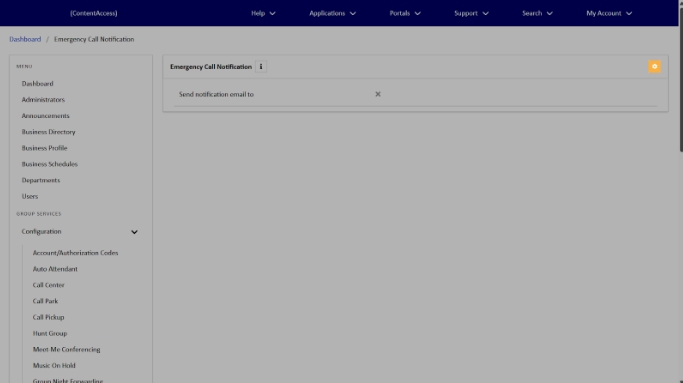
- Click the Edit icon.
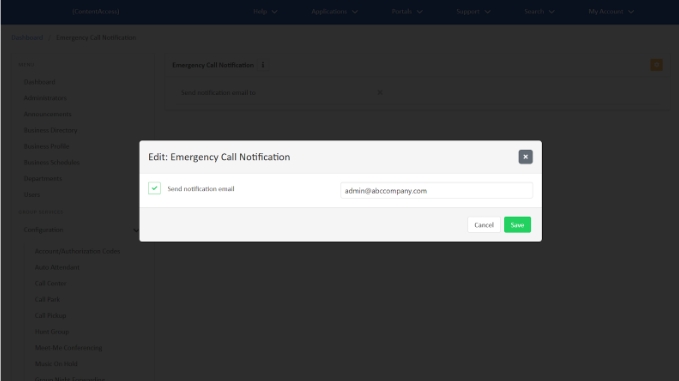
- Check the box to Send notification email and enter the email address you'd like the emergency call notification sent to.
- Click Save.

3.
Configure Emergency Call Notification for Enterprise Administrators
To access Emergency Call Notification:
- From the group dashboard, under Management, select Emergency Call Notification.
- Click the Edit icon.
- Check the box to Send notification email and enter the email address you'd like the emergency call notification sent to. To allow group override, check that box as well. Note: At the Enterprise level, you can also check the box Allow group override.
- Click Save when done.